Gadgetwikimedia.blogspot.com: Xiaomi

Hot

Showing posts with label Xiaomi. Show all posts

Tuesday, August 22, 2017

[ROM] Download And Install MIUI 9 Rom For Redmi Note 4X [Nougat 7.0]

8:11 PM 0

as we all know MIUI 9 (based on android Nougat 7.0)will be the next latest android OS for All Xiaomi devices and you are curious to know which device will get MIUI 9 that is based on latest android Nougat 7.0 in this tutorial we explained how todownload MIUI 9 rom and install latest MIUI 9 rom on Xiaomi Redmi Note 4X.Are you curious to test the latest stable verison of your device but haven’t received the update.Do not be upset, you can still enjoy the ROM by download from the below steps.

Download MIUI 9 Rom for any Xiaomi Device.The Xiaomi Redmi Note 4X sports a 13-megapixel rear camera with PDAF (phase detection autofocus), an f/2.0 aperture and dual-tone LED flash. The 5-megapixel front camera sports an 84-degree wide angle lens.It comes with Snapdragon 625 Octacore Processor.It comes with 4100 mAh battery capacity which can last for more than two days with mixed usage.You can expand its memory upto 128 GB via a micro SD-Card.Today in this tutorial we are going to show you how you can install MIUI 9 for your Redmi Note 4X.

Requirement:

  1. This method is only for the Xiaomi Redmi Note 4X.Donot try it on any other device.
  2. It is advisable to take a backup of your device before proceeding further.
  3. Ensure that your phone has at least 70-80% charged to prevent the accidental shutdown in-between the process.

How TO INSTALL MIUI 9 on Redmi Note 4X

  1. Connect your device to the Windows PC/laptop via a micro USB cable, and copy the ROM file downloaded in Step 1 into the folder ‘downloaded_rom’ in the internal storage of your device.
  2. Launch ‘Updater’ app on your device:
  3. MIUI 6/7/8:Click the ‘…’ icon at the top-right corner, select ‘Choose update package’, and choose the ROM file you’ve put in ‘downloaded_rom’ in Step 2.
  4. MIUI V5:Press the Menu button, select ‘Choose update package’, and choose the ROM file you’ve put in ‘downloaded_rom’ in Step 2.
  5. After choosing the right ROM file, your device will begin upgrading. Your device should automatically boot to the new version when the update is completed.
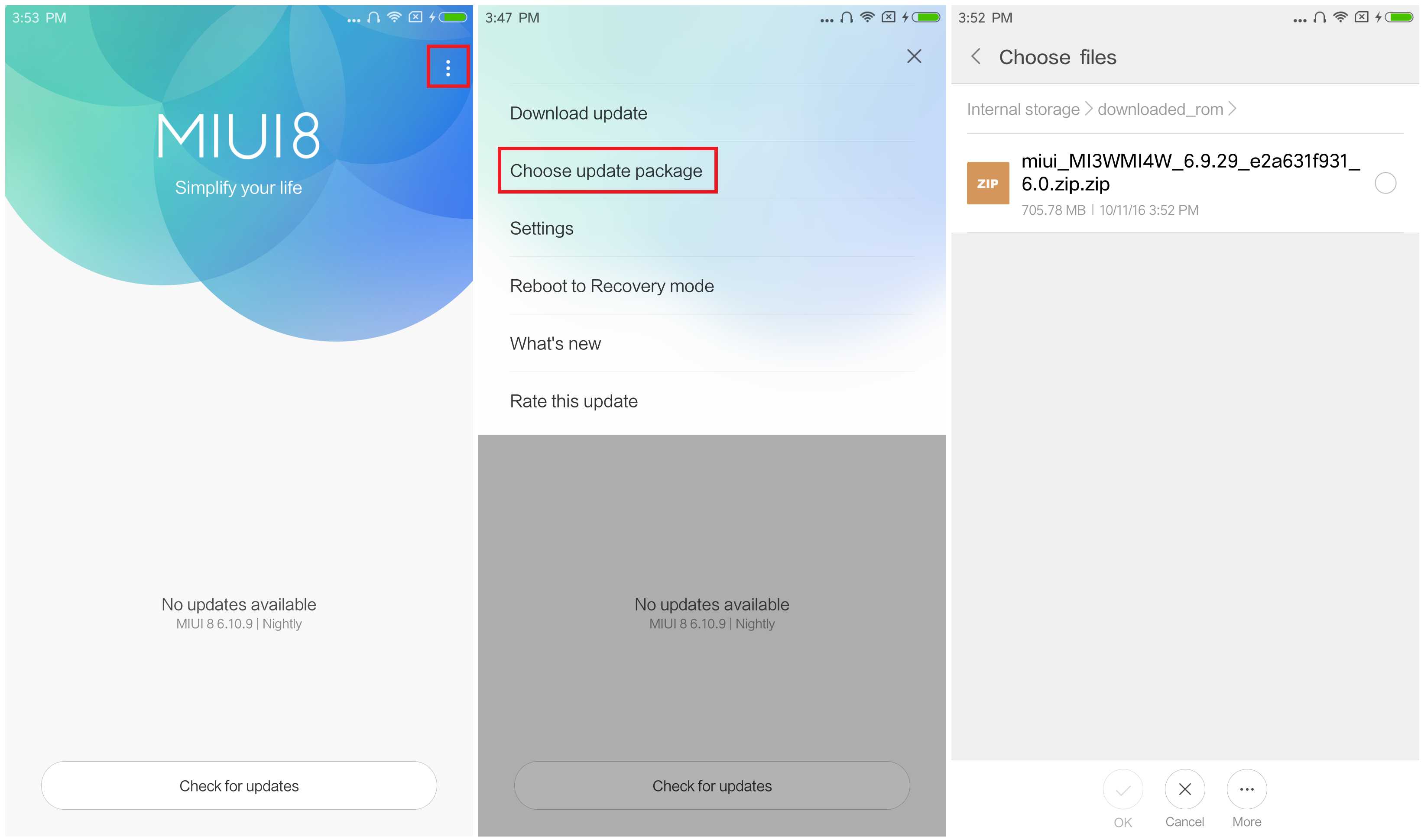
  6. After choosing the right ROM file, your device will begin upgrading. Your device should automatically boot to the new version when the update is completed.
We are not responsible for any damage happened to your device(s) while following this guide, Proceed at your own risk.Install MIUI 9 rom at your own risk.


If you see the following image after rebooting, it means that you have succeeded in flashing MIUI ROM.

If still any queries left in your mind, feel free to ask via comment section.

Read More

Monday, January 18, 2016

How To Repair Software Xiaomi Mi4 (CPU Mediatek)

7:37 AM 0


In a smartphone, we often find anomalies that arise when we wear. And if we let, not uncommon cell phone also suffered damage. The usual damage arises is in the section softawarenya or a part of its software. To overcome this problem, we need to do flashing or rewrite a program in the phone.

Before we flashing a device what else device we will flashing ber mediatek CPU, it's good we do stage backups in advance, let alone the device we will flashing masi is rarely successful. It will be hard as hell looking for firmware/ROM his Stock.

How to process? Let us refer to the following steps. Materials need to be prepared:
a. Download the USB drivers and then Install Mediatek.
b. Download the MDT (Mtk Droid Tools), and then extract it.
c. Download Sp Flashtool, then extract.
d. Download Mobogenie, then Install.

Next up is the

a. open the MDT

b. click the "Root"

Select yes, and wait for the process to complete

In the image below, the red circle will turn green. This means that already can enter the backup steps

c. Tools still at MDT

Then click "To Prepare blocks for Flashtool" and wait for the process to complete

When in the midst of Packing options appear Backup process Backups Yes or No, tothis stage only option only, when we meimilih Yes and in packing so the firmware can only be in flashing using CWM, and under normal circumstances, if you select "No" then the firmware will be on prepare for the memflashing using the Flashtool SPsuitable for the hp Ngebrick and didn't get in CWM.

Once completed, do the Flashing, do I as follows:

Open SP Flash Tool

At no. (1) click and then to the folder "files to Flashtool!" and then select URMtk_allinOne_da.bin. At no. (2) click the scatter loading point to the folder "files to Flashtool!" and then select URMt6582_android_scatter.txt

After the files have been prepared as above "Download" and wait for the process to complete. Wait until it appears a green circle, the sign flashing is finished. Easy isn't it?
Read More

Sunday, January 17, 2016

Xiaomi Redmi Note 3 Will Be Launched Soon

5:43 AM 0


NEW DELHI - Manufacturers Xiaomi based in India, is rumored to be launching a smartphone Redmi Note 3 is officially on the market.

This information is sticking through the chirp or post-an enterprise that is publicized through Twitter. "RT is an awesome news that # RedmiNote3 come," he wrote, as quoted gadgets.ndtv, Friday (15/01/2016).

Xiaomi has promised and has announced the launch of Redmi Note 3 through social channels. Unfortunately, the Chinese company has not revealed the release date.

However, according to a report showed the company will release on January 31.

Xiaomi Redmi Note 3 has a screen size of 5.5-inch Full-HD with a resolution of 1,080 x 1,920 pixels. These devices operate system MIUI 7 based on Android OS.

The Company has highlighted that the smart phone is equipped with metal design features metallic and has a full fingerprint sensor (fingerprint) that can unlock the device in just 0.3 seconds.

Other features of the durability of the battery capacity of 4000 mAh, which is claimed to be charging up to 50 per cent in just over 1 hour. While the kitchen was redone, supported by Helio MediaTek chipset X10, octa-core processor 64-bit Cortex-A53.

Affairs take pictures, Redmi Note 3 has a 13 MP primary camera with a phase detection autofocus (PDAF) two-tone flash, front camera and a 5 MP camera.

Is expected to be launched in the State after the Barata, Redmi Note 3 in the dock at the country market. Smartphones that will be launched is available with color choice Gold, Silver, and Dark Grey.
Read More