Gadgetwikimedia.blogspot.com

Hot

Tuesday, August 22, 2017

[ROM] Download And Install MIUI 9 Rom For Redmi Note 4X [Nougat 7.0]

8:11 PM 0

as we all know MIUI 9 (based on android Nougat 7.0)will be the next latest android OS for All Xiaomi devices and you are curious to know which device will get MIUI 9 that is based on latest android Nougat 7.0 in this tutorial we explained how todownload MIUI 9 rom and install latest MIUI 9 rom on Xiaomi Redmi Note 4X.Are you curious to test the latest stable verison of your device but haven’t received the update.Do not be upset, you can still enjoy the ROM by download from the below steps.

Download MIUI 9 Rom for any Xiaomi Device.The Xiaomi Redmi Note 4X sports a 13-megapixel rear camera with PDAF (phase detection autofocus), an f/2.0 aperture and dual-tone LED flash. The 5-megapixel front camera sports an 84-degree wide angle lens.It comes with Snapdragon 625 Octacore Processor.It comes with 4100 mAh battery capacity which can last for more than two days with mixed usage.You can expand its memory upto 128 GB via a micro SD-Card.Today in this tutorial we are going to show you how you can install MIUI 9 for your Redmi Note 4X.

Requirement:

  1. This method is only for the Xiaomi Redmi Note 4X.Donot try it on any other device.
  2. It is advisable to take a backup of your device before proceeding further.
  3. Ensure that your phone has at least 70-80% charged to prevent the accidental shutdown in-between the process.

How TO INSTALL MIUI 9 on Redmi Note 4X

  1. Connect your device to the Windows PC/laptop via a micro USB cable, and copy the ROM file downloaded in Step 1 into the folder ‘downloaded_rom’ in the internal storage of your device.
  2. Launch ‘Updater’ app on your device:
  3. MIUI 6/7/8:Click the ‘…’ icon at the top-right corner, select ‘Choose update package’, and choose the ROM file you’ve put in ‘downloaded_rom’ in Step 2.
  4. MIUI V5:Press the Menu button, select ‘Choose update package’, and choose the ROM file you’ve put in ‘downloaded_rom’ in Step 2.
  5. After choosing the right ROM file, your device will begin upgrading. Your device should automatically boot to the new version when the update is completed.
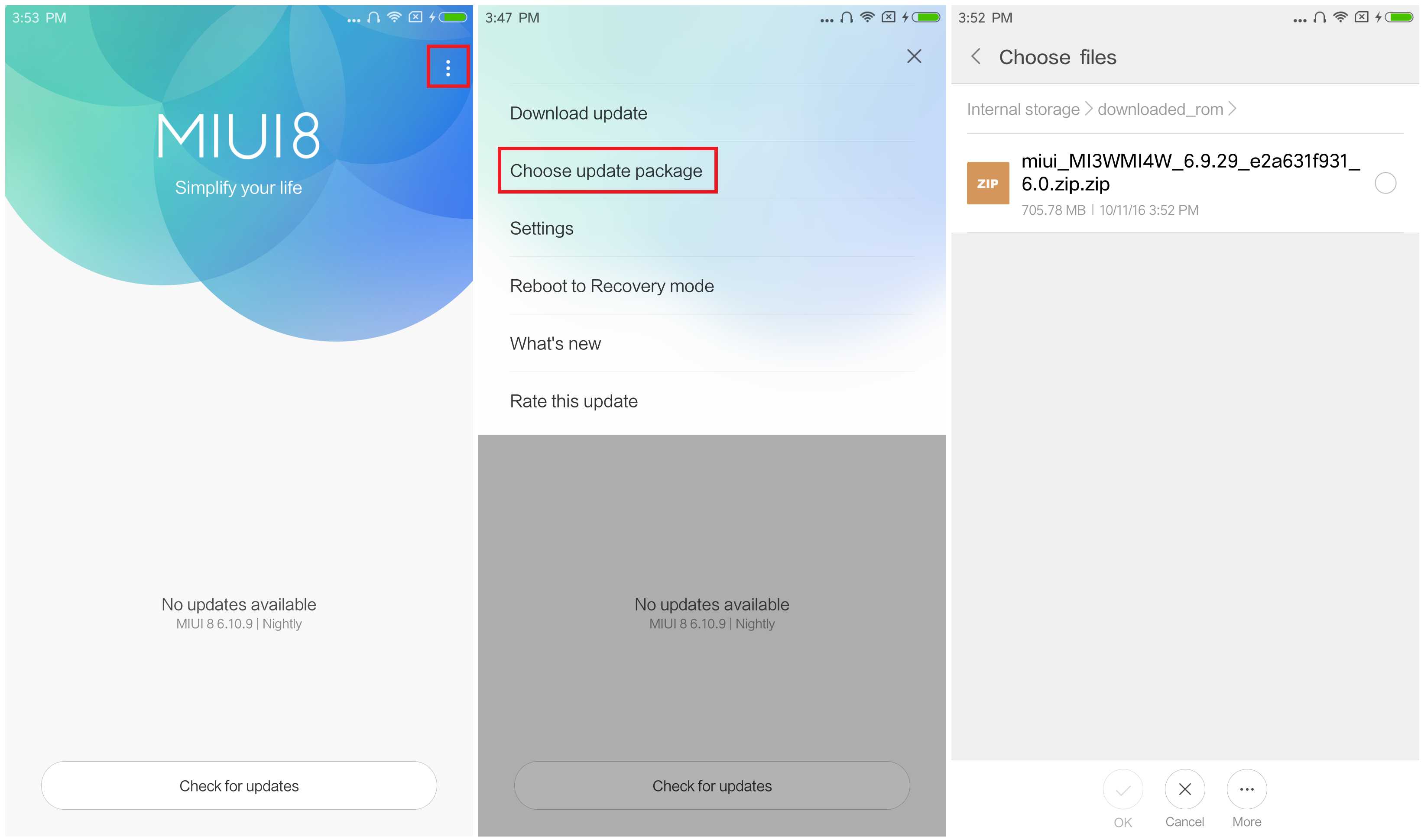
  6. After choosing the right ROM file, your device will begin upgrading. Your device should automatically boot to the new version when the update is completed.
We are not responsible for any damage happened to your device(s) while following this guide, Proceed at your own risk.Install MIUI 9 rom at your own risk.


If you see the following image after rebooting, it means that you have succeeded in flashing MIUI ROM.

If still any queries left in your mind, feel free to ask via comment section.

Read More

Tuesday, January 19, 2016

Samsung Investments USD $ 7.4 for production of Curved OLED screen iPhone

7:46 AM 0


Samsung Investments USD $ 7.4 for production of Curved OLED screen iPhone

Samsung Display rumored has established plans to invest huge funds i.e. USD $ 7.4 billion in prroduksi equipment and components for the production of OLED OLED display arch for iPhone next generation.

It was the first time the information was reported by the local media of South Korea, ET News. For Apple, the step selects the curved OLED screen is considered a new alternative of using screen type LCD.

With this investment, Samsung Display will expand production by 30,000-45,000 substrate in 2016, followed by 45000 substrate in 2017, with a total investment of fractions between two years. As for the production testing equipment and curvedOLED screen will be tilled by the AP System and HB Technology.

In addition to working to fill orders curved OLED screen from Apple, Samsungreportedly Display also has invested USD $ 823 million in manufacturing equipment to meet the extra OLED requests from some Chinese smartphone vendors in addition tomeet the supply screen for Galaxy smartphone from Samsung Electronics.
Read More

Apple Would add Feature the Li-Fi Connectivity in the latest iPhone

7:42 AM 0


About two years ago, Li-Fi were introduced as one of the wireless technology thatsupposedly will be an alternative in addition to free Wi-Fi. This technology is the middle of the tested to send data in the speed of 1Gbps (Gigabyte per second). Atthat speed, Li-Fi technology is claimed to be able to work 100 times faster than Wi-Fi.This means that downloading video files or movies with HD resolution can be done in just seconds.

Using Li-Fi, the process using a flow of light, where data is transmitted at a speed very quickly. And technology that can be used in the future to replace Wi-Fi.

Well, the latest news mentioned that Apple was doing testing from Li-Fi, and show that there are indications the next generation iPhone model will be at the forefront ofinnovation to sample the Li-Fi. Only, don't be too hopeful that Li-Fi technology will be coming soon on iPhone 7, given until now Apple is still doing a series of Li-Fi testing.


Apple will Bekali Li Fi Connectivity In the upcoming generation 

Li-Fi related would be applied on the upcoming iPhone unfolds through the ' filelibrary ' chace in iOS software update 9.1. They are listed in the files that documentmentions "LiFi Capability", right next to the other capabilities. Armed with Li-Fi, lightfrom a source accepted by the light sensor, which then transform it into an electronicsignal which is read by Smartphones.

If Apple manages to embody the technology of Li-Fi on its newest range of productsimaginable, then a renewable world where internet connection is coming from mobile phone technology first developed on December 31, 1879 by Thomas Edison.Wonderful isn't it?
Read More

Apple Promises Fix Data percentage of the Battery on your iPhone and iPhone Plus 6S 6S

7:37 AM 0


Apple Promises Fix Data percentage of the Battery on your iPhone and iPhone Plus 6S 6S

Since the beginning of September 2015 and then, many iPhone users 6S and iPhone Plus 6S complain on social media and forums on Apple's Support page, related about the battery percentage indicator pointer is not accurate. Users of the iPhone and the iPhone Plus 6S 6S says that the experience their devices ' production ' defects and damage are very disturbing.

Imagine if when users see the battery indicator still looks ¾ full, however when it is used to call or open applications suddenly drop and need to dichaz. And applies on the condition instead. It would certainly annoying and troublesome.

Apple has acknowledged the existence of these problems on your iPhone and iPhone Plus 6S 6S, and attempt to fix the problem the battery data indicators are much more accurate. In a document the latest Apple Support, Apple publicly acknowledged the problem was less akuratnya the battery percentage indicator data on the iPhone and the iPhone Plus 6S 6S that should be made into a proper reference pointer as the power supply on your iPhone. Apple says that it has investigated the causes and provide solutions for users.

There is some kind of bug that specifically attack the battery indicator. Same thing with bugs that crawled on digital clocks feature when the user change the time manually, then the pointer will shift another time based on the time zone when traveling. As a temporary solution, Apple advised users to rebooting the iPhone. And then make sure the date and time are set automatically (instead of manually) and enter the menu in the iOS app General Settings 9.

As for the users of the iPhone and the iPhone Plus 6S 6S that have complained about not akuratnya the battery indicator, the Apple promising fix for individuals through the latest iOS update.
Read More

Monday, January 18, 2016

How To Repair Software Xiaomi Mi4 (CPU Mediatek)

7:37 AM 0


In a smartphone, we often find anomalies that arise when we wear. And if we let, not uncommon cell phone also suffered damage. The usual damage arises is in the section softawarenya or a part of its software. To overcome this problem, we need to do flashing or rewrite a program in the phone.

Before we flashing a device what else device we will flashing ber mediatek CPU, it's good we do stage backups in advance, let alone the device we will flashing masi is rarely successful. It will be hard as hell looking for firmware/ROM his Stock.

How to process? Let us refer to the following steps. Materials need to be prepared:
a. Download the USB drivers and then Install Mediatek.
b. Download the MDT (Mtk Droid Tools), and then extract it.
c. Download Sp Flashtool, then extract.
d. Download Mobogenie, then Install.

Next up is the

a. open the MDT

b. click the "Root"

Select yes, and wait for the process to complete

In the image below, the red circle will turn green. This means that already can enter the backup steps

c. Tools still at MDT

Then click "To Prepare blocks for Flashtool" and wait for the process to complete

When in the midst of Packing options appear Backup process Backups Yes or No, tothis stage only option only, when we meimilih Yes and in packing so the firmware can only be in flashing using CWM, and under normal circumstances, if you select "No" then the firmware will be on prepare for the memflashing using the Flashtool SPsuitable for the hp Ngebrick and didn't get in CWM.

Once completed, do the Flashing, do I as follows:

Open SP Flash Tool

At no. (1) click and then to the folder "files to Flashtool!" and then select URMtk_allinOne_da.bin. At no. (2) click the scatter loading point to the folder "files to Flashtool!" and then select URMt6582_android_scatter.txt

After the files have been prepared as above "Download" and wait for the process to complete. Wait until it appears a green circle, the sign flashing is finished. Easy isn't it?
Read More